
How I Set Up Nginx FastCGI Cache for WordPress (Without Breaking Logins)
Table of Contents
The first time I turned on nginx fastcgi cache for a WordPress site, I expected a simple speed win for WordPress performance. I got that, but I also got a surprise: an “instant” homepage can come with weird side effects if you cache the wrong things.
So in this guide, I’ll walk you through the setup I use in 2026 on Nginx + PHP-FPM. It’s copy-paste-ready, uses safe defaults, and includes the checks I run to confirm it’s working (HIT, MISS, BYPASS, TTFB (Time to First Byte), and stale behavior). I’ll also show you how I avoid caching logged-in sessions, carts, and admin pages, checks that are vital for server response time on a modern site.
What Nginx FastCGI cache is really doing for WordPress
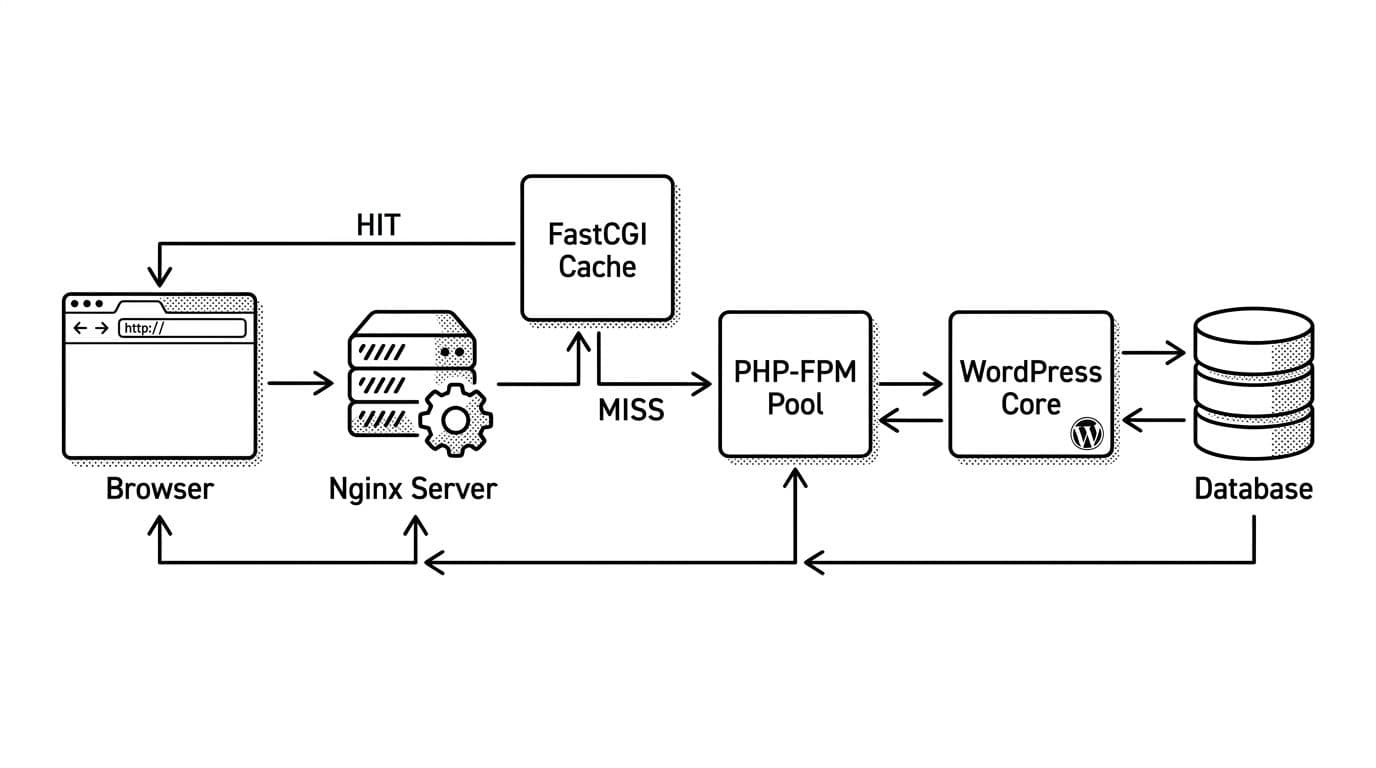
In a LEMP stack, when WordPress renders a page, it wakes up PHP, runs plugins, hits the database, and finally spits out HTML. That’s fine, until traffic spikes and every visitor repeats the same work.
FastCGI caching flips that flow. Nginx stores the static HTML version of dynamic content from PHP-FPM on disk (or in a cache path), then serves it for later requests. On a cache hit, PHP doesn’t even get invited to the party.
This is different from “page cache” plugins. Plugins cache inside WordPress, after PHP boots. Nginx caches before WordPress loads, which is why it’s so fast. If you want a broader view of how nginx fastcgi cache fits into modern WordPress performance stacks, RunCloud’s overview is a solid reference: NGINX FastCGI cache basics.
What I cache
- Public pages for logged-out visitors (home, posts, pages, categories).
- GET and HEAD requests.
What I never cache
- wp-admin, wp-login.php, API endpoints (usually), previews.
- Anything tied to a session, cart, or a user cookie.
Why this matters: the best cache is the one you can forget about. If you cache private content, you’ll “win” speed and lose trust.
Step 1: Define the fastcgi_cache_path and the bypass rules (safe defaults)
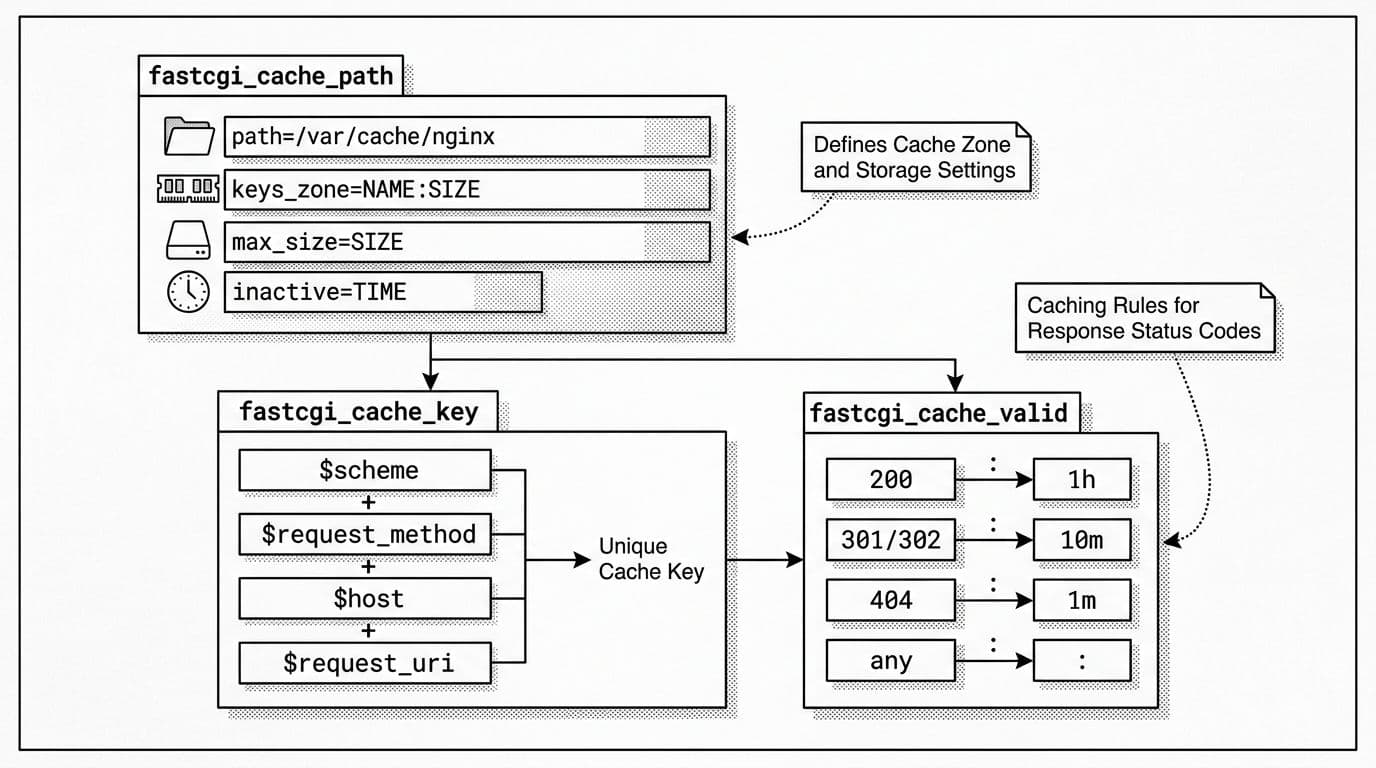
I start in the http {} block (often in nginx.conf), because the cache zone lives there. Before that, I create the cache directory:
sudo mkdir -p /var/cache/nginx/fastcgi_cache
sudo chown -R www-data:www-data /var/cache/nginx
sudo chmod 750 /var/cache/nginx/fastcgi_cache
Now I add the fastcgi_cache_path directive to create a cache zone and “skip cache” signals. These defaults are conservative and work well for most WordPress sites.
Customize these values in the snippet:
/var/cache/nginx/fastcgi_cache(cache path)WORDPRESS(zone name)100m(shared memory zone for keys_zone)2g(max_size)
Here’s the http {} config:
fastcgi_cache_path /var/cache/nginx/fastcgi_cache
    levels=1:2
    keys_zone=WORDPRESS:100m
    inactive=60m
    max_size=2g
    use_temp_path=off;

map $http_cookie $skip_cache_cookie {
    default 0;
    ~*wordpress_logged_in 1;
    ~*wp-postpass_ 1;
    ~*comment_author_ 1;
    ~*woocommerce_items_in_cart 1;
    ~*woocommerce_cart_hash 1;
}

map $request_method $skip_cache_method {
    default 0;
    ~^(POST|PUT|PATCH|DELETE)$ 1;
}

map $request_uri $skip_cache_uri {
    default 0;
    ~*^/wp-admin/ 1;
    ~*^/wp-login.php 1;
    ~*^/xmlrpc.php 1;
    ~*^/wp-json/ 1;
    ~*^/cart/? 1;
    ~*^/checkout/? 1;
    ~*^/my-account/? 1;
}

map $http_cache_control $skip_cache_cc {
    default 0;
    ~*no-cache 1;
    ~*max-age=0 1;
}
These map blocks define bypass rules that handle WooCommerce exclusions to prevent caching sensitive checkout data.
A quick guide to the defaults:
| Setting | Safe default | What I change it to |
|---|---|---|
levels | 1:2 | Keep it unless you have huge scale |
keys_zone | 100m | 200m to 500m for busy sites |
inactive timer | 60m | Higher for low-traffic content |
max_size parameter | 2g | Based on disk space and site size |
Why this matters: the nginx fastcgi cache zone controls disk use and eviction. The bypass rules protect login state, carts, and admin behavior.
Step 2: Turn caching on in the WordPress server block (with headers)

Inside your site’s server {} block, I keep routing normal, then add caching inside the PHP location with directives like fastcgi_pass and fastcgi_param. I also add headers so I can see cache status without guessing.
Customize these values:
server_namerootfastcgi_pass(socket or host:port)fastcgi_cache_validtimes (based on how often your content changes)
Example server block (trimmed to the important parts):
server {
    listen 443 ssl http2;
    server_name example.com www.example.com;


    root /var/www/example.com/public;
    index index.php;


    location / {
        try_files $uri $uri/ /index.php?$args;
    }


    location ~ .php$ {
        include fastcgi_params;
        fastcgi_param SCRIPT_FILENAME $document_root$fastcgi_script_name;


        fastcgi_pass unix:/run/php/php8.2-fpm.sock;


        set $skip_cache 0;
        if ($skip_cache_method) { set $skip_cache 1; }
        if ($skip_cache_cookie) { set $skip_cache 1; }
        if ($skip_cache_uri)    { set $skip_cache 1; }
        if ($skip_cache_cc)     { set $skip_cache 1; }


        fastcgi_cache WORDPRESS;
        fastcgi_cache_key "$scheme$request_method$host$request_uri";


        fastcgi_cache_bypass $skip_cache;
        fastcgi_no_cache $skip_cache $upstream_http_set_cookie;


        fastcgi_cache_valid 200 301 302 10m;
        fastcgi_cache_valid 404 1m;


        fastcgi_cache_lock on;
        fastcgi_cache_lock_timeout 5s;


        fastcgi_cache_use_stale error timeout invalid_header http_500 http_503 updating;
        fastcgi_cache_background_update on;


        add_header X-FastCGI-Cache $upstream_cache_status always;
        add_header X-Cache-Skip $skip_cache always;
    }
}
The skip_cache variable handles conditional logic for bypassing the cache based on request methods, cookies (like for logged-in users), URIs, and cache-control headers. Nginx uses MD5 hashing on the fastcgi_cache_key to identify unique requests.
Why those extra lines help:
fastcgi_cache_lockreduces “thundering herd” when cache expires.fastcgi_cache_validsets durations like 10m for 200 responses, whilefastcgi_cache_use_stale+background_updatekeeps pages fast even during brief upstream errors.X-FastCGI-Cache(populated by$upstream_cache_status) and theX-Cacheheader show HIT or MISS right in your browser devtools.
Why this matters: without response headers, you’ll think caching works when it’s actually bypassing, or worse, caching the wrong users.
Purge and refresh (without installing extra modules)
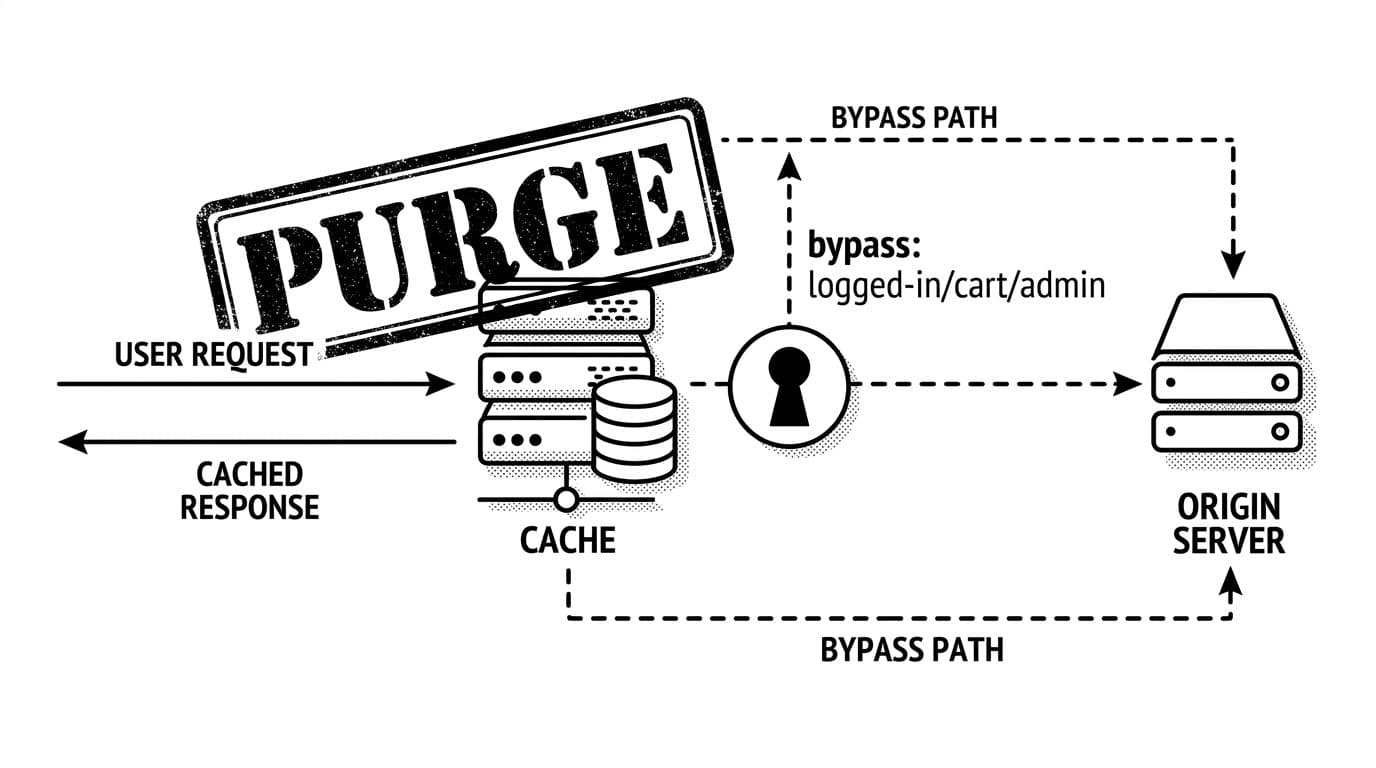
Open-source Nginx doesn’t ship with a built-in “PURGE this URL” feature. So I use simple workflows for purging the cache:
- Refresh one page (purging the cache): request it with
Cache-Control: no-cacheso Nginx bypasses and re-writes the cache. - Clear everything (purging the cache – careful): delete the cache directory contents during a deploy window.
For deeper patterns (like key design tradeoffs), I’ve seen good discussion in this agency write-up: FastCGI cache key ideas.
If you still want plugin help, I treat it as optional. Server-side caching is the base layer, then I tune front-end weight after. For that, I keep a short list of top performance plugins for faster WordPress sites, and I often pair caching with ways to eliminate render-blocking resources plus lazy loading images.
Why this matters: purge is part of daily life. If your only purge plan is “restart stuff,” you’ll dread every update.
Troubleshooting checklist (HIT, MISS, STALE, BYPASS)
When I’m not seeing HITs or when server response time hurts WordPress performance, I run this quick pass:
- Always MISS: I check that I’m testing a public URL, logged out, using GET, and not sending
Cache-Control: no-cache. - Always BYPASS: I look at cookies first. A stray
wordpress_logged_incookie from wp-admin will do it. - No cache headers at all: I confirm
add_header ... always;is inside the PHP location, then reload Nginx. - WooCommerce pages caching: I verify the cart and checkout URI rules, plus the Woo cookies in
map. - Seeing old content: I shorten
fastcgi_cache_validduring heavy editing, or refresh with a no-cache request.
Final validation with curl (my go-to commands)
I like terminal checks because they don’t lie.
-
First request should usually be MISS:
curl -I https://example.com/
Expected headers include:
X-FastCGI-Cache: MISS(first hit)X-Cache-Skip: 0
-
Second request should be HIT:
curl -I https://example.com/
Expected:
X-FastCGI-Cache: HIT
-
Force a refresh (bypass and re-cache):
curl -I -H “Cache-Control: no-cache” https://example.com/
Expected:
X-FastCGI-Cache: BYPASS(or MISS), then the next request becomes HIT again.
Wrapping it up
Once I had nginx fastcgi cache set up with the right bypass rules, WordPress stopped feeling “fragile” under load. Pages stayed quick, PHP-FPM calmed down, and traffic spikes became boring. Start with safe defaults, add the cache status headers, and test with curl until you trust what you’re seeing. When your next plugin update lands, you’ll be glad you built server-side caching for dynamic content you can verify in seconds.